From Flat LAN to Segmented Homelab
planning and building a VLAN-segmented homelab network — tiers, a build order that avoids any outage, a real VPN kill switch, and the mistakes worth skipping.
in building my homelab — part 1 i mentioned i’d probably start segmenting the network with VLANs “once things get harder to manage.”
things got harder to manage.
this is the walkthrough i wish i’d had — planning, the build order that costs zero downtime, a VPN-isolated segment with an actual kill switch, and the mistakes that ate the most time.
why segment at all
a flat network means every device trusts every other device by default. a compromised smart plug can talk to your NAS. a guest on your wifi can see your admin panels. it works fine right up until it doesn’t.
the real trigger for me wasn’t a security incident — it was realizing i wanted to add a dedicated automation stack that needed to always route through a VPN, and bolting that onto a flat network with a per-host firewall alias felt like exactly the kind of thing that fails quietly six months later.
structural isolation beats “remember to keep this list updated,” every time.
homelab tiers, roughly
| tier | budget | what it looks like |
|---|---|---|
| starter | $0–50 | stock router, maybe a pi-hole |
| basic self-hosting | $100–400 | one mini-PC on Proxmox, still one flat network |
| segmented (this guide) | $400–900 | managed switch, dedicated router OS, VLANs |
| advanced | $900+ | clustered nodes, dedicated VPN-routed workloads, real NAS |
you don’t need “advanced” hardware to build a “segmented” network — the router does all the VLAN logic. more compute nodes is a completely separate axis.
planning the VLAN scheme
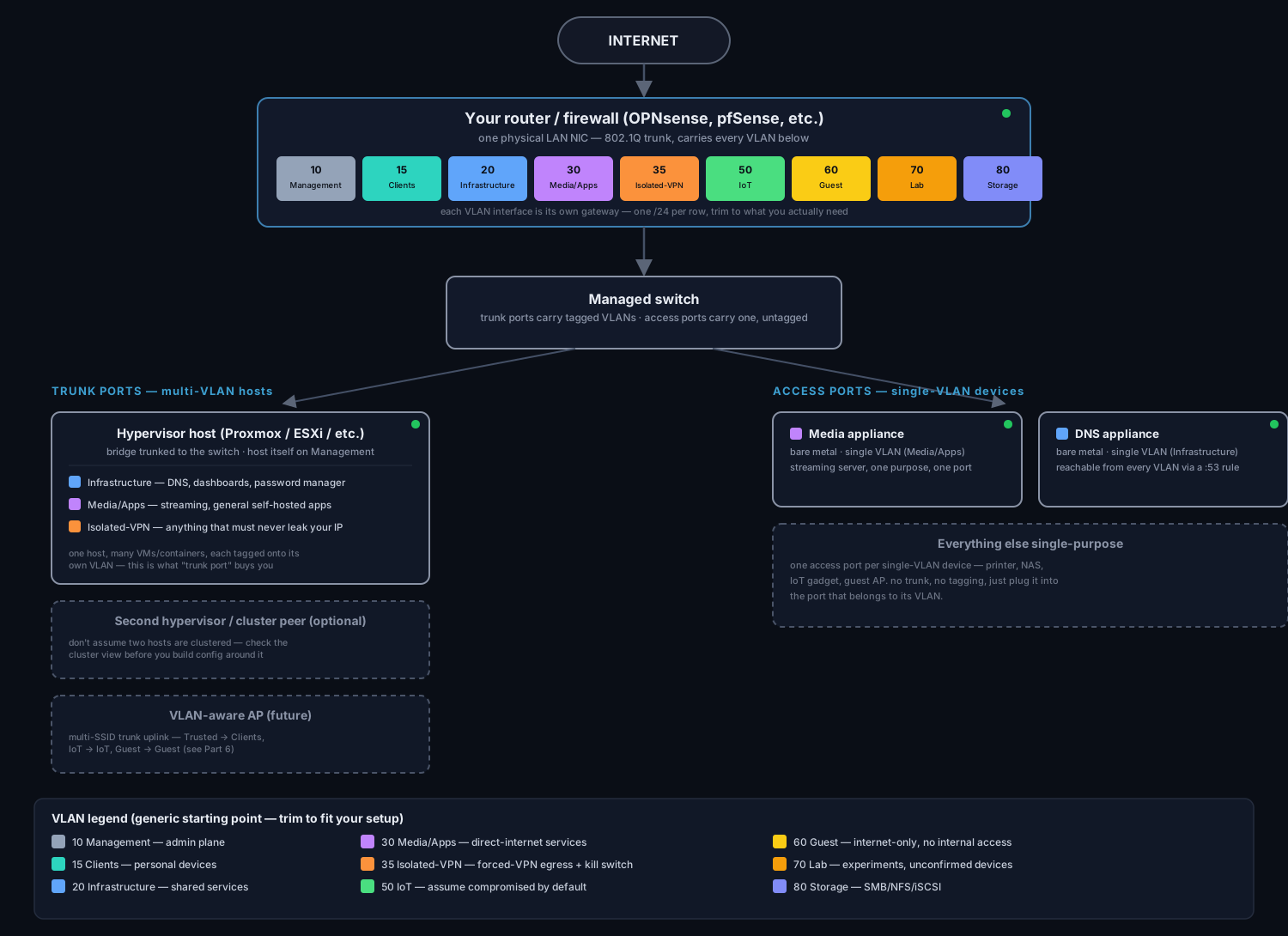
a generic starting table:
| VLAN | purpose | who lives here |
|---|---|---|
| Management | admin plane | router, switch, AP, hypervisor GUIs |
| Clients | personal devices | your phone/laptop — not the same as Management |
| Infrastructure | shared services | DNS, dashboards, password manager |
| Media/Apps | direct-internet services | streaming, general self-hosted apps |
| Isolated-VPN | forced-VPN egress | anything that must never leak your real IP |
| IoT | smart-home devices | assume compromised by default |
| Guest | visitor wifi | internet-only, no internal access |
| Lab | experiments | anything unconfirmed or throwaway |
| Storage | NAS/file services | SMB, NFS, iSCSI |
trim what you don’t need. a single-person homelab probably skips Guest. a household with kids’ devices might want it day one.
do you actually need a managed switch?
yes, if you want more than one physical device carrying tagged VLAN traffic. an unmanaged switch forwards everything as one broadcast domain and strips 802.1Q tags — your router-side VLAN config sits there doing nothing until it’s replaced.
port budget, before you buy: 1 router uplink + 1 trunk per multi-VLAN host + 1 access port per single-purpose device + real headroom for hardware you haven’t bought yet. undercounting this is the most common “should’ve gotten the bigger switch” regret.
the build order that costs nothing
this is the part that surprised me — you can build almost the entire thing before buying anything.
- create VLAN interfaces on the router — config objects only, inert until wired to a trunk
- assign + enable each one, give it a static
.1gateway address - build a DHCP subnet per VLAN — pool range, router, DNS
- add static reservations for anything you’ll want to find by IP
- hold off on repointing system-wide DNS — more on that below
- build firewall rules — default-deny, allow only what’s listed
- then buy and rack the switch, migrate devices one at a time
steps 1–6 are safe because an unmanaged switch strips 802.1Q tags regardless of what your router thinks it’s doing. i built the entire VLAN interface/DHCP/firewall config over a few sessions with zero risk to the network i was actively using, weeks before the switch showed up.
step 5 is the one exception — it’s the one setting that’s global rather than scoped to an unwired VLAN. flip it too early and you break live DNS resolution immediately, since the new addresses aren’t reachable yet.
the VPN-isolated VLAN pattern
if you have any workload that should always exit through a VPN, don’t rely on a per-host alias or an in-container VPN client alone. give it its own VLAN and enforce the routing structurally.
two firewall rules, in order:
| # | action | gateway | purpose |
|---|---|---|---|
| 1 | pass | VPN tunnel | force all matching traffic through the tunnel |
| 2 | block | (none) | catch anything rule 1 couldn’t route, and drop it |
rule order is the entire mechanism — most firewalls evaluate top-down, first match wins. rule 2 only fires when rule 1 failed to route through the tunnel, which is exactly the failure mode you’re guarding against: silently falling back to your real IP instead of just not working.
an in-container VPN client works too, but ties the VPN config to that one container’s definition and usually has no real kill switch — if the client process dies, traffic can fall back to the host’s normal route depending on how it’s wired. a VLAN-level kill switch protects everything on that VLAN, regardless of what’s running there.
cutover
everything above can be built with zero live impact. cutover is the one phase that actually touches your running network — do it deliberately, one device at a time.
- wire the router’s uplink into a trunk port on the new switch
- move multi-VLAN hosts (hypervisors) to trunk ports, tag their VMs onto the right VLANs
- move single-purpose devices to access ports on their assigned VLAN
- for any device with a manually configured static IP, switch it to DHCP client so it actually picks up its reservation — easy to forget, and the reservation does nothing until you do this
- now repoint system-wide DNS, since the new addresses are finally reachable
- retire the old unmanaged switch
then verify: each VLAN reaches exactly what it should, DNS resolves everywhere, export a config backup once it’s stable.
wireless — the gap i’m accepting for now
consumer mesh wifi is almost universally VLAN-incapable — no per-SSID tagging. that’s what i’m running, so wireless segmentation waits until i replace it with VLAN-aware APs. deliberate decision, not an oversight — worth writing down as one instead of quietly forgetting about it.
when that AP shows up, the plan is a Trusted SSID → Clients VLAN, an IoT SSID → IoT VLAN, a Guest SSID → Guest VLAN. the AP’s uplink becomes a trunk port, same trunking concept as any multi-VLAN host.
lessons learned
trust the live config, not the old doc. i had the wrong physical NIC name written down for weeks, copied from an early note instead of verified against the actual box. didn’t cause a live problem — nothing was wired up yet — but it would have if i’d built firewall rules against it blind.
the menu moves between versions. a documented path like “Interfaces → Other Types → VLAN” had actually moved to “Interfaces → Devices” on the version i was running. verify the live menu before following any written path literally.
the “everything just broke” moment that wasn’t. mid-session, DNS started intermittently timing out and recovering on its own. turned out every config change i applied was triggering a brief resolver reload — a few seconds of timeout, entirely expected, not a real break. know this ahead of time so you don’t burn twenty minutes debugging a non-issue.
two boxes i assumed were clustered weren’t. i’d documented two hypervisor hosts as a cluster, based on an old assumption instead of a checked fact. the actual cluster view showed only one node the whole time — they were two independent standalone installs. check the running state, not your memory, especially for anything you didn’t personally set up recently.
the pattern across all four: verify against the live system. infrastructure drifts, docs go stale, the box in front of you is the source of truth.
part 3 will probably be wireless, once a real AP shows up. or storage, if the NAS happens first. we’ll see which one gets harder to put off.